Configure Standard Solution Preferences
Solution Preferences define the foundational configuration for the Standard Solution. It’s where solution admins establish how requests are collected, processed, routed, tracked, and reviewed across the entire intake-triage-resolution lifecycle.
Preferences act as the control center for the Standard Solution. Admins and makers can use the settings found here to apply consistent rules, templates, and automations across all parts of the solution. Each page within Preferences focuses on a specific layer of that configuration—from the initial request experience to how requests are ultimately resolved and reviewed.
In short, Preferences allow admins to:
Define global defaults for intake flows, triage rules, and resolution processes.
Control how users interact with the request system through forms, questionnaires, and notifications.
Configure automation and routing logic that determines how requests move between teams.
Set up monitoring, review, and audit mechanisms for governance and compliance.
Connect the solution to enterprise tools and data sources to enrich request data and reporting.
Access Solution Preferences
Preferences are accessible to system users with maker permissions on the relevant solution. For more information for admins about adding system users, see Manage Users. For adding users as makers, see Manage Makers.
You can find the Preferences section on the main Solutions Studio screen. To access Preferences, follow the steps below:
From any screen, select the main nav icon,
 , in the upper left, and select Solutions Studio. Your available solutions display.
Select the solution you want to configure or update. The main solution screen displays.
In the side menu on the left side of the screen, scroll down to find PREFERENCES.
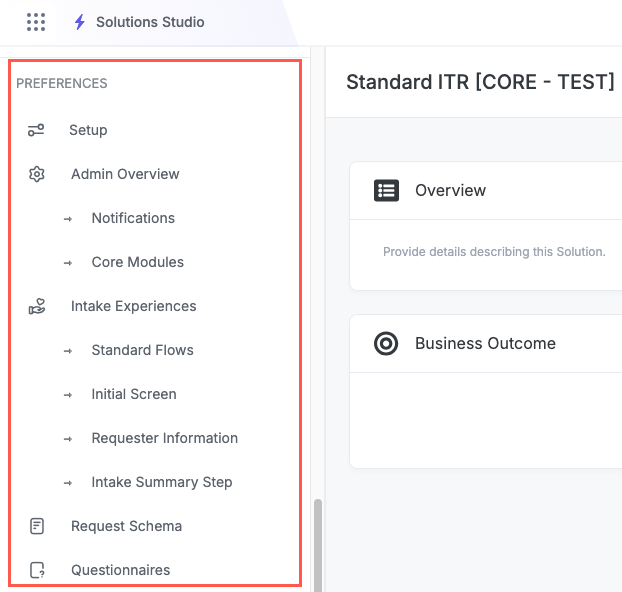
Standard Solution Preference Configuration
See the relevant topic here for configuration and customization information using Solution Preferences: